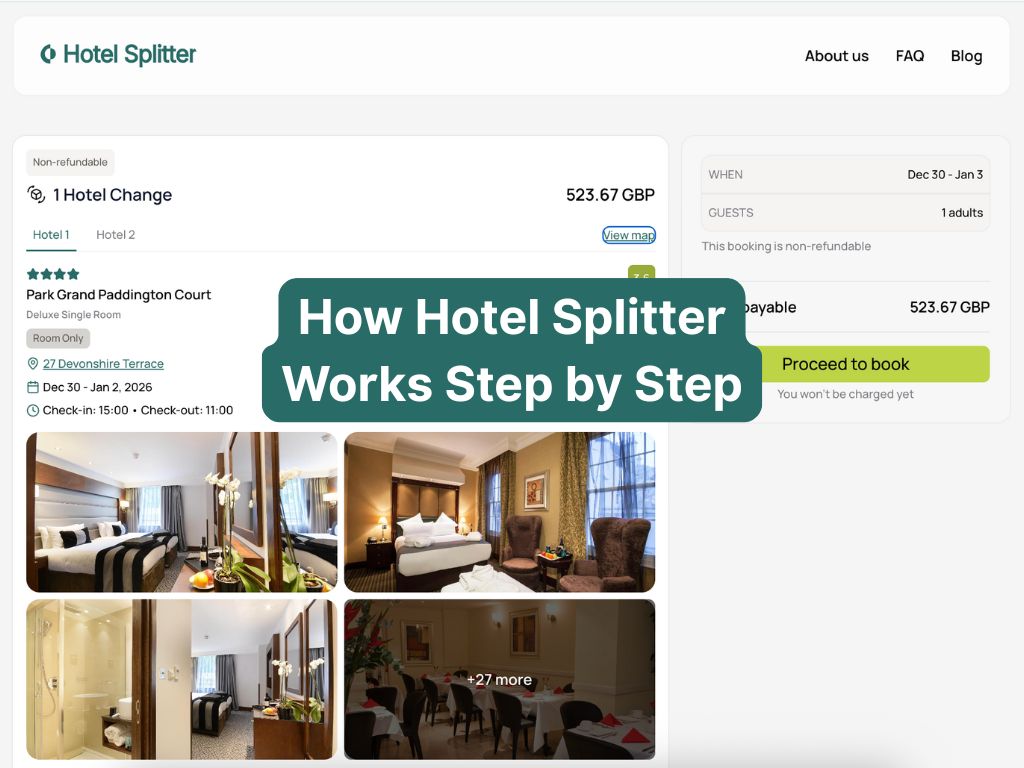
How Hotel Splitter Works Step by Step
Hotel Splitter is built around a simple idea: instead of forcing one hotel to cover every night of your city break, we help you build a stay that can use one or more hotels, often with one easy midweek switch. You see one clear total in £ for the whole itinerary, instead of juggling several separate bookings yourself.
This page walks through how Hotel Splitter works today, step by step, so you know what to expect before you try a search.
TL;DR: Today, Hotel Splitter is designed around accommodation-only city breaks, and we are live first in London. You pick your dates, guests and basic filters, choose how many hotel changes you are open to (0, 1 or 2), and we show you full itineraries built around those settings. Each itinerary has a clear total price in £ for what you pay us, plus a breakdown of any hotel-collected extras. Checkout runs through a secure Revolut payment page and you receive one Hotel Splitter confirmation for your whole stay.
Before you start: what Hotel Splitter supports today
To keep things honest and simple, here is what the current version of Hotel Splitter does and does not support:
- City: We are currently live in London. Other cities are planned, but not available yet.
- Type of stay: Accommodation only (hotels and apartments). We do not sell flights.
- Trip length: Best suited to city breaks of about 5–7 nights, although you can search for shorter or longer stays.
- Hotel changes: You can choose 0, 1 or 2 hotel changes. We do not support changing hotel every night.
- Guests: We currently support adult guests in one room per booking.
- Star filter: You will see a range of properties returned by our partners. You can optionally turn on a 4+ stars only filter if you want to focus on higher-rated hotels.
Even if your trip looks a little different to this, running a search will show you what we can and cannot cover today.
Step 1: Enter where and when you want to stay
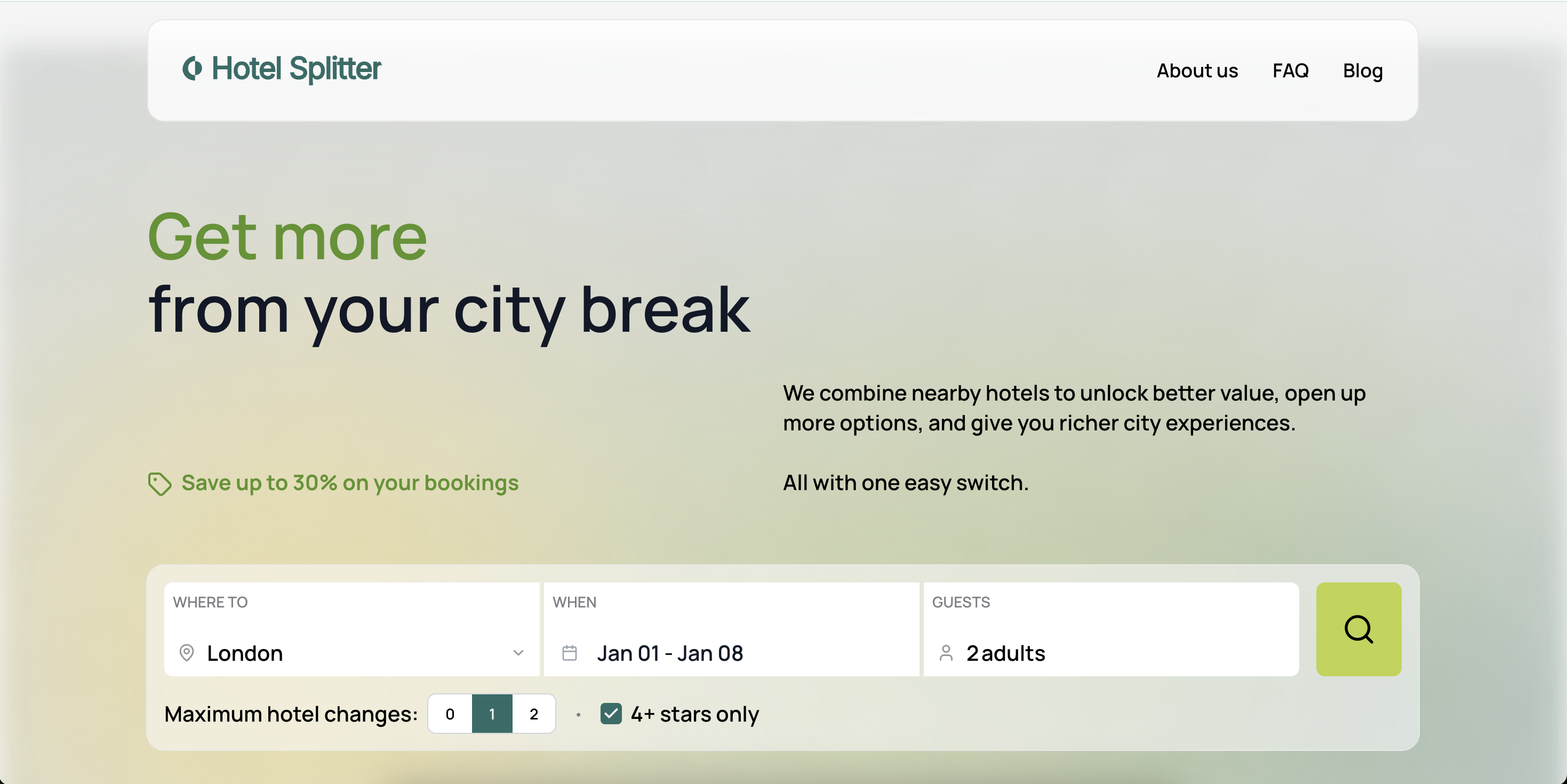
On the homepage or search page, you start by choosing:
- Where: London (our first live city).
- When: your arrival and departure dates, for example a 7 night Sunday to Sunday stay.
- Guests: the number of adults (we currently support one room per booking).
Hotel Splitter works especially well for city stays of about 5–7 nights, where one or two moves can make a noticeable difference to availability and the feel of the week.
Step 2: Set your basic filter
Next, you can set one simple filter to steer the results:
- 4+ stars only: turn this on if you want to focus on higher-rated hotels. If you leave it off, you will see a broader mix of properties returned by our partners.
We keep the controls small on purpose, so the focus stays on the structure of your week rather than dozens of toggles.
Step 3: Choose how many hotel changes you are open to
This is the key Hotel Splitter setting. You pick the maximum number of hotel changes you are comfortable with:
- 0 changes: the system shows you single-hotel stays that cover your entire trip.
- 1 change: we can split your stay across two hotels, with one planned move mid-trip.
- 2 changes: we can use up to three hotels, with up to two moves, still built to keep switch days manageable.
Most users start with 0 or 1 change. The 2-change option is there if you are comfortable moving a little more and want to see more combinations.
Step 4: Explore the results tabs
When you hit search, Hotel Splitter shows you results in tabs so you can compare structures quickly. Depending on your settings, you will see some or all of:
- Top Picks: a small curated set of options that we highlight when we spot especially strong combinations for your search, for example a good balance of location, quality and price. If you do not see this tab for a given search, you can still browse all available options under the other tabs.
- Single Hotel Stays: itineraries where you stay in one hotel for the entire duration.
- 1 Hotel Change: itineraries where your stay is split across two hotels, with one switch.
- 2 Hotel Changes: (only shown if you allowed 2 changes) itineraries that use up to three hotels, with two planned moves.
Within each tab, each card represents one complete itinerary. A card typically includes:
- The label (for example “Single stay” or “1 Hotel Change”).
- Which nights are in each hotel, with check-in and checkout dates.
- Hotel names, areas, star level and summary ratings.
- A clear total price in £ for the whole itinerary, for what you pay Hotel Splitter.
- Icons or notes for travel time between hotels on switch day, where available, for split stays.
From the results list you can also open a map view to see where each hotel in a split stay sits relative to the others, or where a single hotel is located within the city.
Step 5: Open an itinerary to see the details
Clicking a card opens the full itinerary view.
For single stays, you will see one hotel section with:
- Hotel photos, address and amenities.
- The room type included for your dates.
- Whether the stay is room only or includes breakfast, where specified by the hotel.
- Check-in and checkout times.
- A “View map” link that opens a map centred on that hotel.
For split stays, you will see tabs such as “Hotel 1”, “Hotel 2” (and “Hotel 3” if applicable). Each tab shows the details for that part of the itinerary:
- Photos, address, amenities and room type for that hotel.
- Dates, check-in and checkout times for that segment.
- Whether that segment is room only or includes breakfast, where specified.
- A “View map” link that opens a map overlay showing all hotels in the itinerary, so you can see how they sit within the city.
On both single and split-stay views, an “Important information” section covers things like city taxes or property-specific policies.
The price section shows one total in £ for the itinerary that you pay through Hotel Splitter. Where we know that a hotel will charge extra fees at the property, such as local taxes, resort-style charges or pet fees, we aim to show those as separate “pay at hotel” lines before you book, so you are not surprised later.
Step 6: Book securely through our checkout
Once you are happy with an itinerary, you move to the booking and payment step. This is where you:
- Enter guest details (names and contact information).
- Confirm your dates and hotel segments one last time.
- Review the total in £ you will pay to Hotel Splitter.
- Review any clearly labelled “pay at hotel” items that are not part of the amount charged by us.
- Enter your card details on our secure payment page.
Our checkout is powered by Revolut. Card details are entered on a hosted, encrypted payment form and sent securely to the payment processor. We do not ask you to send money to a personal bank account or pay offline.
Depending on the itinerary, you may be booking a non-refundable or flexible rate. The cancellation and change rules for each itinerary are shown during checkout, and we encourage you to read them before you confirm.
Step 7: After booking – confirmations and what to expect
After payment, you are redirected back to Hotel Splitter and see a confirmation screen. You then receive:
- A Hotel Splitter confirmation email, with your full itinerary, dates and hotel details.
- Any reference numbers you may need at the property, where these are issued to us by our partners.
- Contact details to reach Hotel Splitter if something on the booking side needs attention.
The hotels in your itinerary are responsible for providing the accommodation itself. Hotel Splitter acts as the booking platform and coordinator for the structure of your stay.
What a typical one-change week looks like
To make this more concrete, here is what a typical one-change week might look like for a 7 night London stay:
- Nights 1–3 in a hotel close to a busy, central area where you want to be for the first part of your trip.
- A planned switch in the middle of the week, usually in late morning or early afternoon.
- Nights 4–7 in a different area that gives you a calmer base, different local feel, or better access to the second half of your plans.
You still see one total in £ at checkout, one confirmation email and one city break. The only extra step is a straightforward move between hotels partway through your stay.
How this fits with our other guides
If you want to go deeper into why we structure trips this way, or how to make switch day feel easy, these pages are good companions to this step-by-step guide:
- What are split stays and how they work – a plain-English introduction to the split stay concept.
- Is Hotel Splitter legit and how we work – more on trust, payments and protections.
- Our mid-week hotel switch guide – practical tips on planning and timing your move.
- Left luggage in London – options for storing bags between check-out and check-in.
- London split-stay guide – how split stays feel on the ground in our first live city.
FAQs: using Hotel Splitter
Do I have to switch hotels?
No. If you set maximum hotel changes to 0, we only show single-hotel stays that cover your entire trip. You can use Hotel Splitter purely as a way to search and compare full-week hotel options.
How many hotel changes can I allow?
You can choose 0, 1 or 2 hotel changes. Most travellers start with 0 or 1; the 2-change option is for people who are comfortable moving a little more and want to see more combinations. We do not support changing hotel every night.
Can I book flights through Hotel Splitter?
Not at the moment. Hotel Splitter focuses on accommodation-only city stays. You book your flights or trains separately.
Can I pick specific areas or hotels?
Right now you cannot pin specific areas on a map inside the tool. You can see hotel locations and areas in the itinerary view, and you can choose between different itineraries. Our system aims to keep combinations within sensible travel times across the city so switch days feel like a short hop, not a long transfer.
Is Hotel Splitter always cheaper than booking one hotel yourself?
Sometimes a split stay can work out better value or open up rooms that are not available for all nights, especially when prices vary a lot across your week. Other times a single-hotel stay may be similar. Hotel Splitter helps you compare different structures so you can decide what works best for your trip.
Ready to try a step-by-step search?
The easiest way to understand Hotel Splitter is to run a real search for your dates. You will see, in one place, how a week can be structured as a single-hotel stay, a one-change split stay or, if you choose, a two-change itinerary.
Start a London search and follow these steps in real time to see how the results feel for your trip.
Last updated: 19 Dec 2025.